
Python 3.14 で入った t-string(PEP 750)は、f-string と見た目が同じで中身が別物です。この記事では 3.14.7 の実環境で動かして分かった、制約とはまりどころをまとめます。
t-string は f-string と何が違うのか
- t-string のサンプルは見たものの、f-string と何が違うのか、まだ自分の言葉で説明できない
- PEP 750 を読んでも、変換や書式がどこまで自動で効くのか分からない
- 自前の処理関数を書くときに、どこで事故るかを先に知りたい
対象読者: Python 3.14 に上げた、またはこれから上げる人。
前提知識: f-string と、SQL のパラメータバインドの基本。
結論
t-string は文字列ではなく Template オブジェクトを返します。変換(!r)と書式(.2f)は保存されるだけで、適用するのは読む側の仕事です。
from string.templatelib import Template

name = "World"
print(t"Hello {name}!")

# 実行結果(Python 3.14.7)
# Template(strings=('Hello ', ''), interpolations=(Interpolation('World', 'name', None, ''),))
つまり t"Hello {name}!" の時点では「Hello World!」になっていません。断片をつないで文字列に組み替える処理を書いて、はじめて文字列になります。
f-string との違い
| f-string | t-string | |
|---|---|---|
| 返る型 | str | string.templatelib.Template |
!r と書式 |
自動で適用される | Interpolation に保存されるだけ |
| str との連結 | できる | TypeError |
| 内容が同じものの比較 | True | False(同一性で比較) |
len() |
文字数を返す | TypeError |
Template と Interpolation の中身を見る
構成要素は strings と interpolations の2つです。values は後者から値を取り出しただけのものになります。
from string.templatelib import Template

name = "World"
template = t"Hello {name}!"
print("strings:", template.strings)
print("values:", template.values)
print("interpolations:", template.interpolations)
print("list():", list(template))

a, b = "A", "B"
twice = t"{a}{b}"
print("consecutive strings:", twice.strings)
print("list() skips empty:", list(twice))
print("zip(strings[1:], values):", list(zip(twice.strings[1:], twice.values)))

# 実行結果
# strings: ('Hello ', '!')
# values: ('World',)
# interpolations: (Interpolation('World', 'name', None, ''),)
# list(): ['Hello ', Interpolation('World', 'name', None, ''), '!']
# consecutive strings: ('', '', '')
# list() skips empty: [Interpolation('A', 'a', None, ''), Interpolation('B', 'b', None, '')]
# zip(strings[1:], values): [('', 'A'), ('', 'B')]
strings は補間の数より1つ多く、要素が交互に対応します。補間が隣り合うと間に空文字が入るので、zip(strings, values) で組にすると対応がずれます。
実際 t"{a}{b}" では ('', 'A') と ('', 'B') という、対応の取れていない組が返りました。値を取るだけなら values を使うのが安全です。
conversion と format_spec は適用されない
f-string なら 3.14 と表示される .2f でも、t-string では値が生のまま残ります。
from string.templatelib import convert

pi = 3.14159
print("interpolation:", t"{pi:.2f}".interpolations[0])
print("raw value:", repr(t"{pi:.2f}".values[0]))
print("f-string:", f"{pi:.2f}")
print("conversion attr:", t"{pi!r}".interpolations[0])
print("value is not converted:", repr(t"{pi!r}".values[0]))
print("convert(pi, 'r'):", convert(pi, "r"))
print("convert(pi, None):", convert(pi, None))
print("debug spec:", t"{pi=}".strings, t"{pi=}".interpolations)

# 実行結果
# interpolation: Interpolation(3.14159, 'pi', None, '.2f')
# raw value: 3.14159
# f-string: 3.14
# conversion attr: Interpolation(3.14159, 'pi', 'r', '')
# value is not converted: 3.14159
# convert(pi, 'r'): 3.14159
# convert(pi, None): 3.14159
# debug spec: ('pi=', '') (Interpolation(3.14159, 'pi', 'r', ''),)
自分で convert() を呼べば f-string と同じ結果になります。!r に repr()、!s に str()、!a に ascii() を割り当てるだけのヘルパーです。
書式のほうは format(value, interpolation.format_spec) で適用します。f-string の 3.14 はこの2つを書いて初めて手に入ります。
デバッグ用の = も挙動が違います。t"{pi=}" では "pi=" が strings 側に入り、conversion が 'r' になるだけでした。
f-string と同じ見た目で挙動が違う箇所
型が違うので、文字列だと思って触るところが軒並みエラーになります。
- 等価比較:
Templateは同一性で比較されます。t"a{x}" == t"a{x}"は False で、set に入れても重複しません。 - 連結:
Template + strもstr + Templateも TypeError です。静的な文字列はTemplate()で包むか、Interpolationにします。 len(): ありません。一方inは__iter__経由で動くので、ここが紛らわしいところです。str()と logging:__str__が無いのでstr(template)は repr になります。
import logging

x = 42
template = t"x is {x}"
print("str(t):", str(template))
print("f == t:", f"x is {x}" == template)
print("t == same source:", t"a{x}" == t"a{x}")
print("set of 2 equal templates:", len({t"a{x}", t"a{x}"}))
print("'x is ' in t:", "x is " in template)
print("t + t:", (t"a " + t"b{x}").strings, (t"a " + t"b{x}").values)

try:
    t"a" + "b"
except TypeError as e:
    print("t + str:", type(e).__name__, e)

try:
    len(template)
except TypeError as e:
    print("len(t):", type(e).__name__, e)

try:
    template.format()
except AttributeError as e:
    print("t.format():", type(e).__name__, e)

logging.basicConfig(level=logging.INFO, format="%(levelname)s %(message)s")
logging.info(t"user={x}")

# 実行結果
# str(t): Template(strings=('x is ', ''), interpolations=(Interpolation(42, 'x', None, ''),))
# f == t: False
# t == same source: False
# set of 2 equal templates: 2
# 'x is ' in t: True
# t + t: ('a b', '') (42,)
# t + str: TypeError can only concatenate string.templatelib.Template (not "str") to string.templatelib.Template
# len(t): TypeError object of type 'string.templatelib.Template' has no len()
# t.format(): AttributeError 'string.templatelib.Template' object has no attribute 'format'
# INFO Template(strings=('user=', ''), interpolations=(Interpolation(42, 'x', None, ''),))
最後の logging の行が象徴的です。logging.info(t"user={x}") は「user=42」ではなく Template(...) の repr をログに残します。
実践1: SQL をプレースホルダに振り分ける
断片と値を分けて返す関数を1つ書くと、値が必ずバインドに回ります。
import sqlite3

def sql(template, /):
    """静的な断片とプレースホルダを分けて返す。値は必ずバインドに回す。"""
    parts = []
    params = []

    for item in template:
        if isinstance(item, str):
            parts.append(item)
        else:
            parts.append("?")
            params.append(item.value)

    return "".join(parts), params

def fresh():
    con = sqlite3.connect(":memory:")
    con.execute("CREATE TABLE users (name TEXT, role TEXT)")
    con.execute("INSERT INTO users VALUES ('yuki', 'admin')")
    return con

evil = "x'; DROP TABLE users; --"

con = fresh()
con.executescript(f"SELECT name FROM users WHERE name = '{evil}'")
try:
    con.execute("SELECT count(*) FROM users").fetchall()
    print("f-string:", "users は無事")
except sqlite3.OperationalError as e:
    print("f-string:", type(e).__name__, e)

con = fresh()
query, params = sql(t"SELECT name FROM users WHERE name = {evil}")
print("t-string:", query, params)
print("結果:", con.execute(query, params).fetchall())
print("users:", con.execute("SELECT count(*) FROM users").fetchall())

try:
    fresh().execute(t"SELECT name FROM users WHERE role = {'admin'}")
except TypeError as e:
    print("sqlite3 に Template を直渡し:", type(e).__name__, e)

# 実行結果
# f-string: OperationalError no such table: users
# t-string: SELECT name FROM users WHERE name = ? ["x'; DROP TABLE users; --"]
# 結果: []
# users: [(1,)]
# sqlite3 に Template を直渡し: TypeError execute() argument 1 must be str, not string.templatelib.Template
f-string 版では DROP が実行され、次のクエリでテーブルが消えていました。t-string 版は同じ入力でも値が ? に置き換わり、テーブルは無事です。
sqlite3 の execute() は Template を直接受け取りません。con.execute(t"...") は TypeError になるので、変換は上の sql() のような自分の関数で行います。
実践2: HTML エスケープ用のレンダラ
エスケープをレンダラ側の責任にできるのが、t-string の主目的です。
import html
from string.templatelib import convert
TAG_CHARS = "<>"
def render(template, /):
out = []
for item in template:
if isinstance(item, str):
out.append(item)
continue
value = convert(item.value, item.conversion)
out.append(html.escape(format(value, item.format_spec), quote=True))
return "".join(out)
user_input = ""
print("render の長さ:", len(render(t"{user_input}")), "/ f-string の長さ:", len(f"{user_input}"))
print("render にタグ文字が残る:", any(c in render(t"{user_input}") for c in TAG_CHARS))
print("f-string にタグ文字が残る:", any(c in f"{user_input}" for c in TAG_CHARS))
print("format_spec:", render(t"{3.14159:.2f} / {7:04d}"))
# 実行結果
# render の長さ: 51 / f-string の長さ: 29
# render にタグ文字が残る: False
# f-string にタグ文字が残る: True
# format_spec: 3.14 / 0007render 側はタグ文字が残らず、f-string 側は残っています。エスケープで文字列が長くなっているのも、値が置換された証拠です。
convert() と format() を通しているので、桁揃えの書式も一緒に効きます。
つまずきポイント
- 3.13 以下では
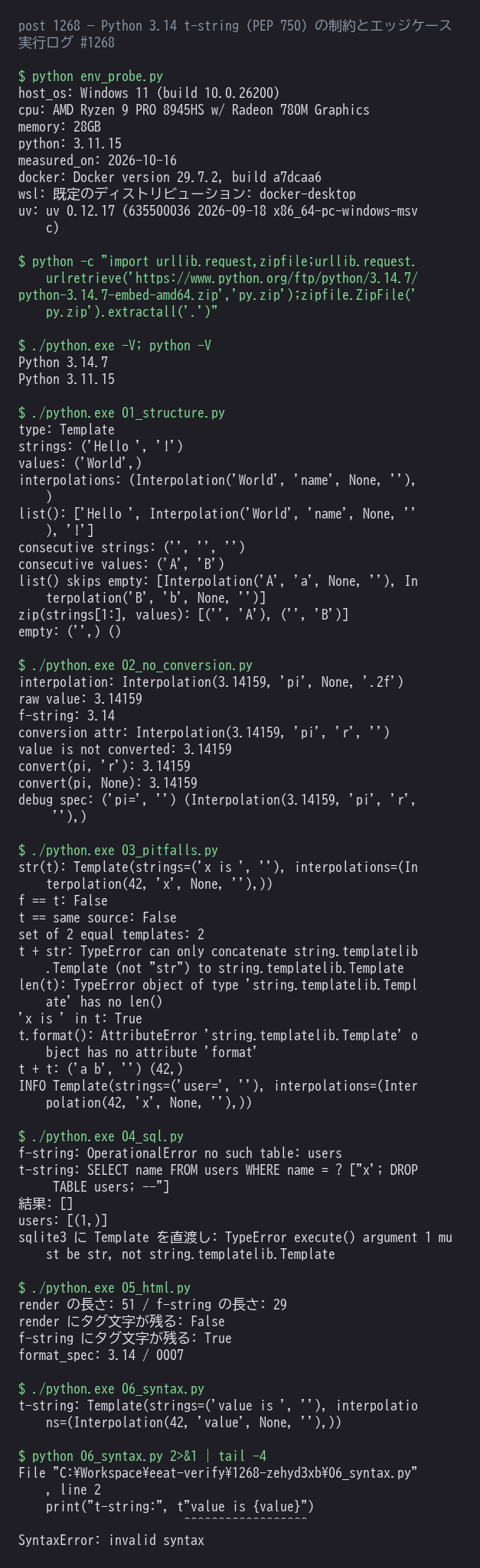
t"..."が構文エラーになります。3.11.15 で SyntaxError、3.14.7 で動作することを確認しました。 ft"{x}"は書けません。'f' and 't' prefixes are incompatibleの SyntaxError になります。f-string の補間の中に t-string を置くのは可能です。if not templateで空を判定できません。Templateは__bool__もlen()も持たないため、t""でも True になります。- set や dict のキーに使うと重複しません。等価比較が同一性なので、内容が同じでも別物として扱われます。
$ python 06_syntax.py
  File "06_syntax.py", line 2
    print("t-string:", t"value is {value}")
                        ^^^^^^^^^^^^^^^^^^
SyntaxError: invalid syntax

$ ./python.exe 06_syntax.py
t-string: Template(strings=('value is ', ''), interpolations=(Interpolation(42, 'value', None, ''),))
検証環境
| OS | Windows 11 (build 10.0.26200) |
|---|---|
| CPU | AMD Ryzen 9 PRO 8945HS w/ Radeon 780M Graphics |
| メモリ | 28GB |
| 言語/ツール | Python 3.14.7(python.org の embeddable 配布を一時ディレクトリに展開) / Python 3.11.15(ホスト側・構文エラーの比較用) |
| 使用コマンド | ./python.exe で t-string の検証スクリプトを実行 / ホストの python で同じファイルを実行して SyntaxError を再現 |
| 測定日 | 2026-10-16 |
上記の環境で実際に実行して確認した結果です。環境が異なる場合は挙動が変わることがあります。
まとめ
- t-string は「値を加工してから連結する」ための道具です。文字列が欲しいだけなら f-string で構いません。
- 効くのは、SQL・HTML・シェル・ログのようにエスケープを挟みたい場面です。
- 移行するときは、戻り値が str でないことによる差(比較・連結・
len())を先に解消しておくと事故りません。
まずは値を受け取る関数を1つ書き換えて、values をそのまま使っていた箇所から置き換えていくのが現実的ですね。
参考
- PEP 750 – Template Strings(t-string の仕様)
- string.templatelib — Support for template string literals(公式リファレンス)
- What’s new in Python 3.14(日本語)
- 2. Lexical analysis — Template string literal (t-string) syntax
- cpython Lib/string/templatelib.py(実装。
convert()の本体もこのファイルにあります) - PEP 701 – Syntactic formalization of f-strings(t-string が引き継いだ文法)
【広告】お名前.comならドメイン取得が格安。
あわせて読みたい
- 【Python】frozendict 深掘り — Python 3.15 の不変辞書の制約とエッジケースを実測
- 【Python】Python 3.15 移行ログ — 3.14 から上げて壊れた箇所と直し方
- 【Python】flake8 + black + isort から Ruff 0.17 へ移行したログ — 実際に壊れた4箇所
- 【Python】Python 3.14 完全ガイド2026 — Free-Threading と JIT
【広告】このサイトはConoHa WINGで運営しています。安定した高速サーバーで快適にブログを書けています。いつもありがとう!!
コメント